What is Smart Measurement?
The Smart Measurement feature is designed to eliminate errors caused by human interference in the camera preview. If any motion is detected in the camera’s view, the measurement process will not continue until the preview is clear and motionless, ensuring accurate and reliable measurements.
Follow the steps below to Enable "Smart Measurement" in Forge:
1. Login to vMeasue Forge. Link : vMeasure
2. Navigate to the Workflows page as shown below
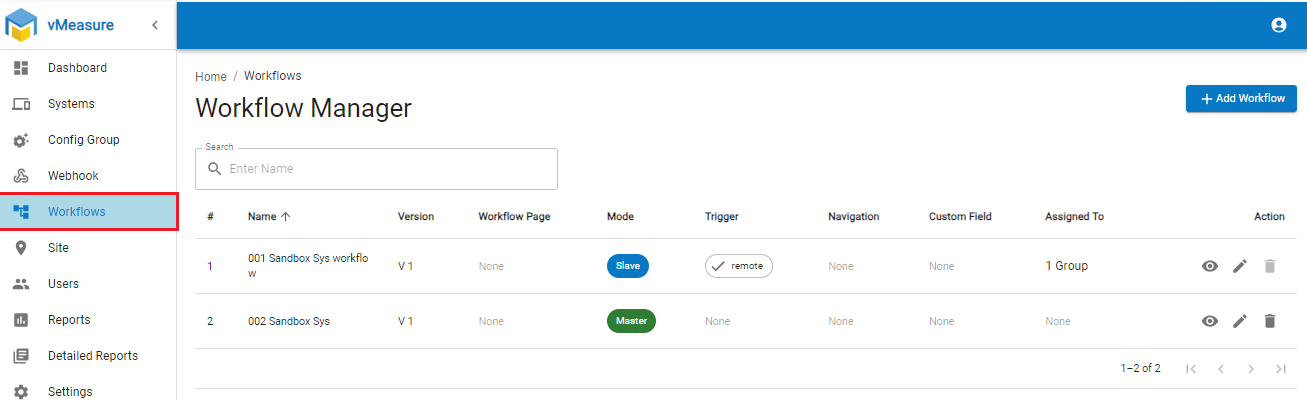
3. . Edit the desired workflow
4. Navigate to the "Smart Measurement" and enable it as shown below.
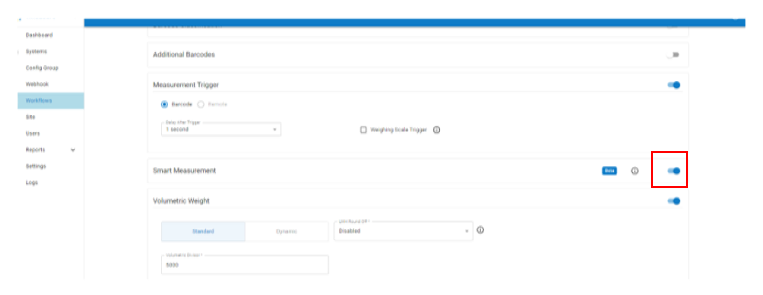
5. Click on the Next button and Save the workflow.
6. On the vMeasure system, re-login for the workflow changes to be downloaded.
If you need any support , please drop a mail to vmeasure@visailabs.com or Click here to Submit a Ticket.
Was this article helpful?
That’s Great!
Thank you for your feedback
Sorry! We couldn't be helpful
Thank you for your feedback
Feedback sent
We appreciate your effort and will try to fix the article