Raw Value :
The raw value is the original, unprocessed, and unmodified data obtained directly from measurements or data collection.
Default Value (Round-off Value) :
The default value, often referred to as the round-off value, is a simplified version of the raw value, typically adjusted to a certain number of decimal places
1. Login to vMeasure
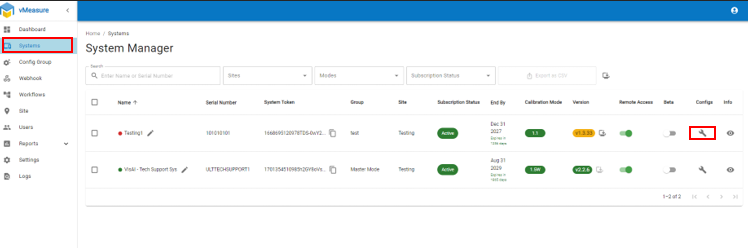
2. Navigate to "System" and Click on "Config"
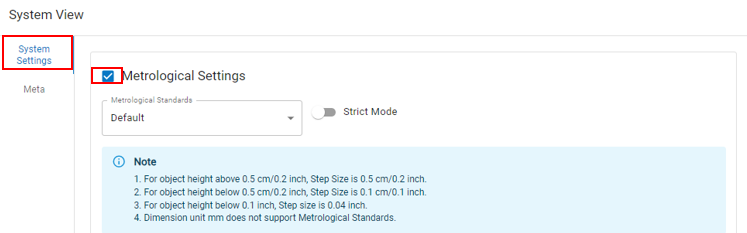
3. Click on "System Setting" and Enable "Metrological Setting"
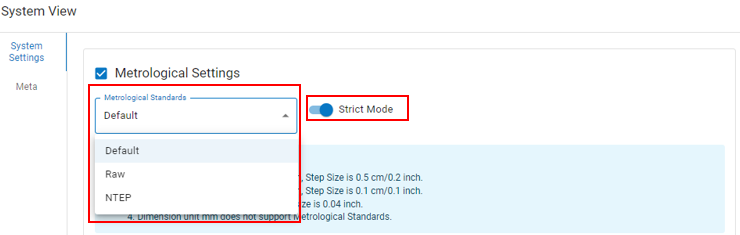
4. Select "Default" or "Raw" from the dropdown and enable "Strict Mode"
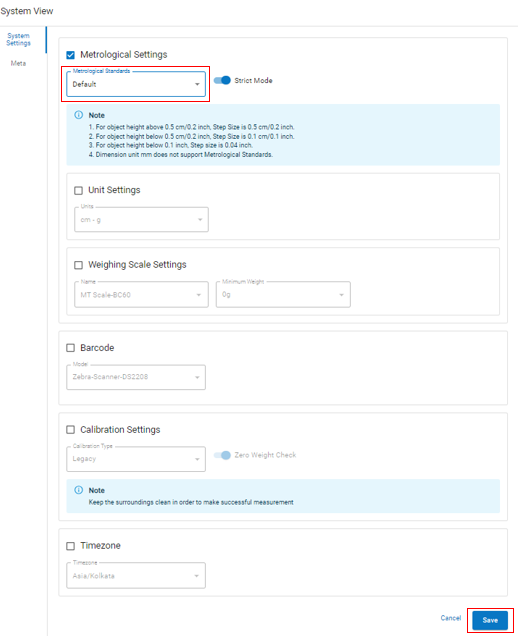
5. Once selected click on "Save"
If you need any support , please drop a mail to vmeasure@visailabs.com or Click here to Submit a Ticket.
Was this article helpful?
That’s Great!
Thank you for your feedback
Sorry! We couldn't be helpful
Thank you for your feedback
Feedback sent
We appreciate your effort and will try to fix the article