Please find below the steps to disable the Auto Power OFF feature on your Global Industrial-T9F244244 weighing scale.
Note:
A. Use the TARE/PRESET key to enter an option or confirm (OK).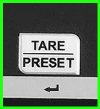
B. Use the ARROW keys to navigate.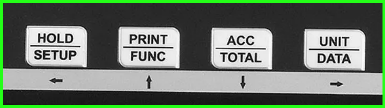
Steps to Disable Auto OFF:
- Press and hold the HOLD/SETUP key for 3 seconds (CONFIG option will be displayed on the screen).
- Using the ARROW keys, navigate to the USER option & press TARE/PRESET to enter.
- Use the ARROW keys to select OTHER, then press TARE/PRESET to enter.
- Navigate to A.OFF.T mode using the ARROW keys & press TARE/PRESET to enter.
- Set the value to " 0 " (Zero).
- Finally, press TARE/PRESET to save the configuration.
If you need any support , please drop a mail to vmeasure@visailabs.com or Click here to Submit a Ticket.
Was this article helpful?
That’s Great!
Thank you for your feedback
Sorry! We couldn't be helpful
Thank you for your feedback
Feedback sent
We appreciate your effort and will try to fix the article