The vMeasure system provides various interfaces to integrate and get the measurement data flowing to the client. This section explains the possible ways of integration.
1. vMeasure Forge Webhook - Master Mode
2. vMeasure Forge API - Slave Mode
3. vMeasure Ultima API – Slave Mode
4. Measure Desk – Master Mode
5. Measure Desk – Slave Mode
vMeasure Forge Webhook– Master Mode
Prerequisites
1. Webhook to which the vMeasure system can push the measurement data.
Workflow
The workflow for the Master Mode of operations using the vMeasure Forge Webhook is as follows.
1. The user places the object on the vMeasure system and triggers the measurement.
2. The vMeasure system captures the measurement.
3. The vMeasure system pushes data to the vMeasure Forge.
4. The vMeasure Forge pushes the data to the respective webhook as configured.
5. If the webhook is not configured, the data can be fetched from vMeasure Forge using the APIs.
Sequence Diagram: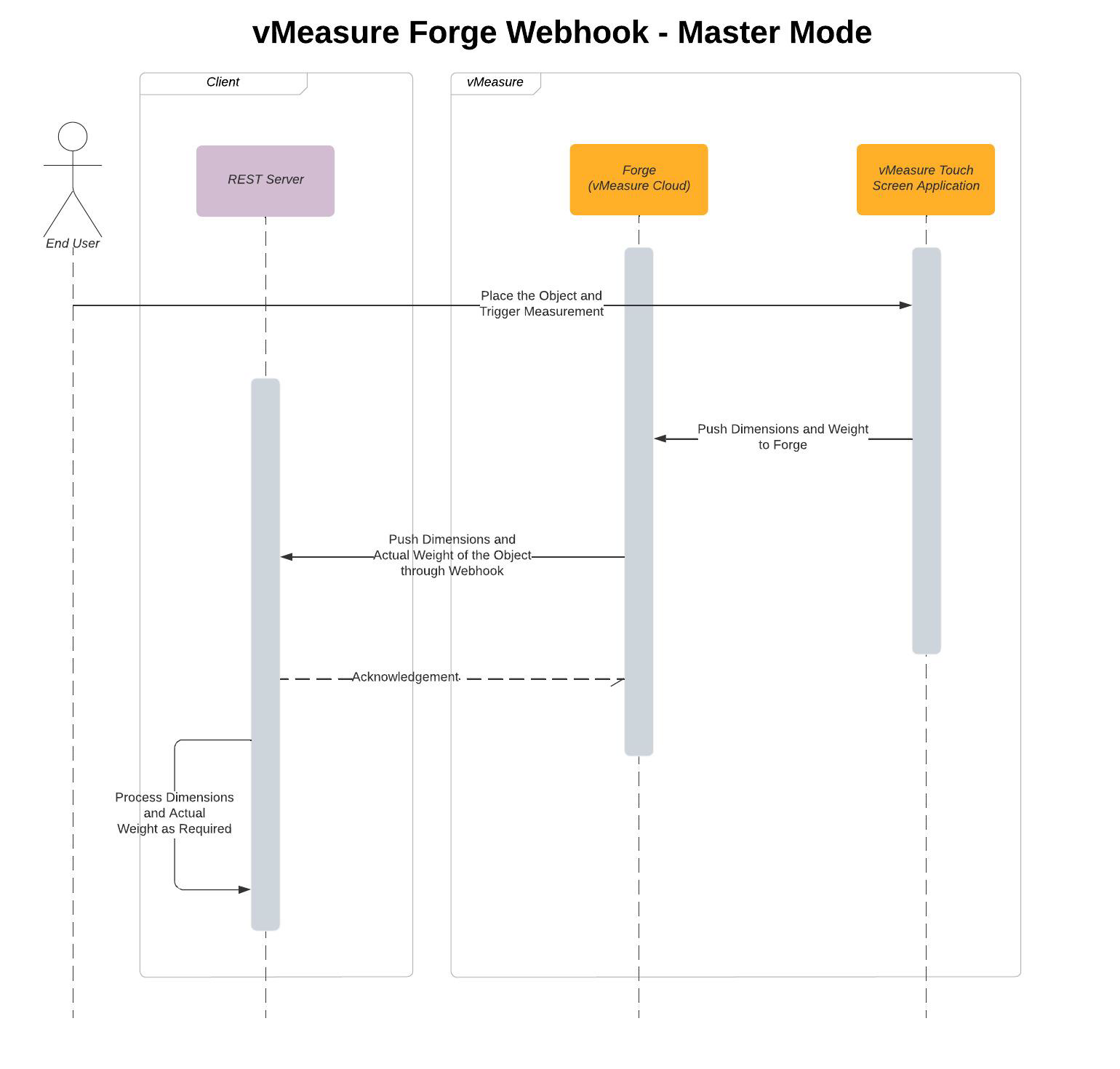
vMeasure Forge API – Slave Mode
Workflow
The workflow for the Slave Mode of operations using the vMeasure Forge is as follows.
1. The user places the object on the vMeasure system.
2. The user triggers the measurement from the client system. The client system uses the vMeasure Forge’s Live Measurement API to trigger the measurement.
3. The vMeasure Forge receives the request and sends the request to the vMeasure system.
4. The vMeasure system captures the measurements and pushes them to the vMeasure Forge.
5. The vMeasure Forge shall respond to the Live Measurement API Request with the measurement data.
Sequence Diagram
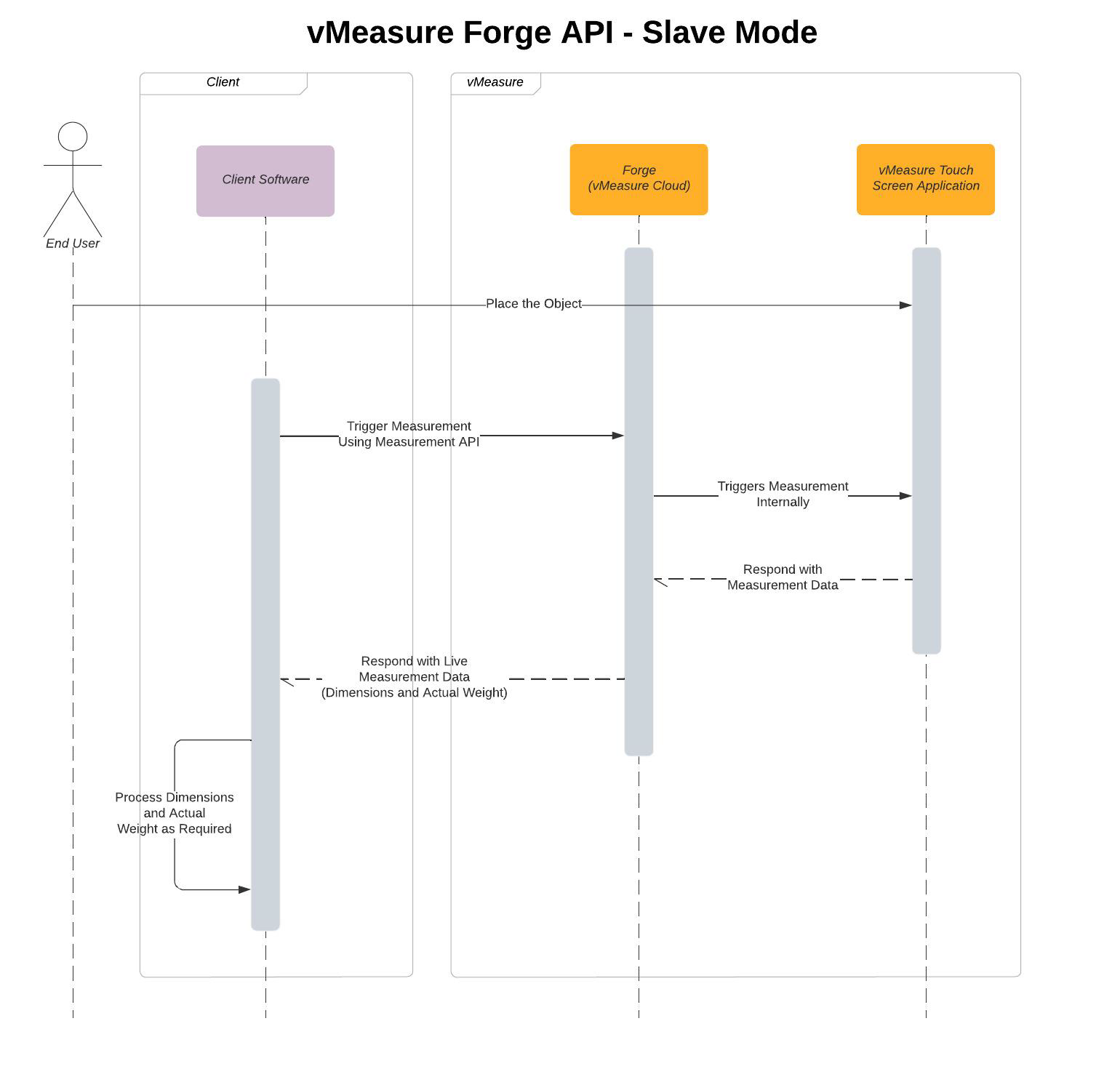
vMeasure Ultima API – Slave Mode
Prerequisites
1. The vMeasure and client systems shall be connected to the same network.
Workflow
The workflow for the Slave Mode of operations using the vMeasure Device API is as follows.
1. The user authenticates the access to the vMeasure system using Authentication & Pairing API. The Authentication & Pairing API internally uses vMeasure Forge for authentication purposes.
2. Upon successful authentication, the user places the object on the vMeasure system.
3. The user triggers the measurement from the client system. The client system uses the vMeasure Ultima’s Live Measurement API to trigger the measurement.
4. The vMeasure system captures the measurement with the dependency of the vMeasure Forge.
5. The vMeasure system shall respond to the Live Measurement API Request with the measurement data.
Note: The measurement data will also be pushed to vMeasure Forge and can be viewed on the vMeasure Forge’s reports page.
Sequence Diagram
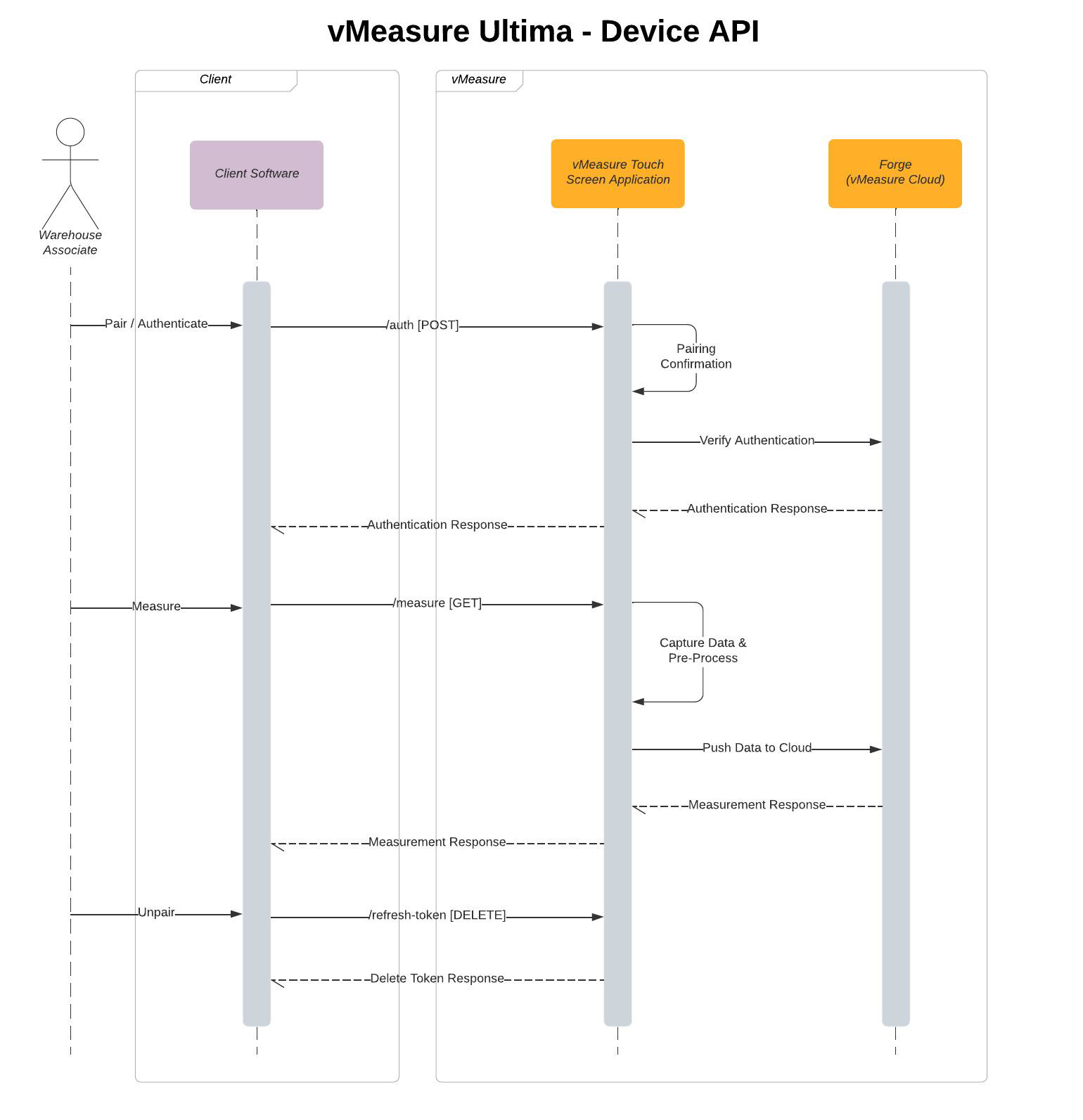
Measure Desk – Master Mode
Prerequisites
1. The vMeasure and client systems shall be connected to the same network.
2. The Measure Desk desktop application shall be installed on the client’s system.
3. The Measure Desk application shall run in the background on the client’s system.
Workflow
The workflow for the Master Mode of operations using the Measure Desk application is as follows.
1. The user pairs the Measure Desk application with the vMeasure system using the vMeasure system’s network IP.
2. The user places the object on the vMeasure system and triggers the measurement.
3. The vMeasure system captures the measurements with the dependency of the vMeasure Forge.
4. The vMeasure system pushes the data to the Measure Desk application.
5. The Measure Desk application acts like a desktop wedge and pastes the measurement data where the cursor is placed.
Note: The Measure Desk must be configured as required.
6. The Measure Desk application can also save the measurement data on the client system locally in CSV, TSV, or JSON format.
Sequence Diagram
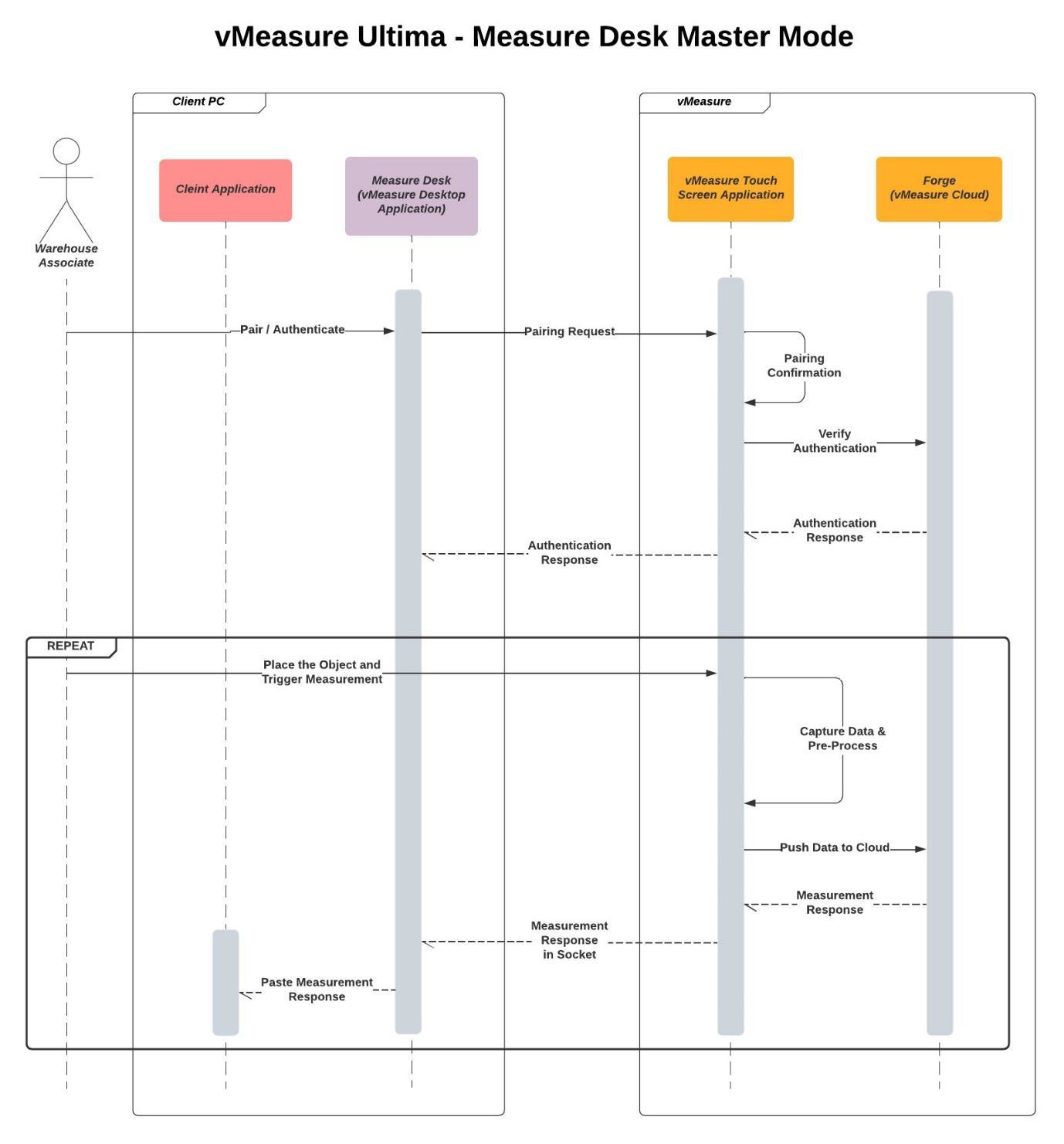
Measure Desk – Slave Mode
Prerequisites
1. The vMeasure and client systems shall be connected to the same network.
2. The Measure Desk desktop application shall be installed on the client’s system.
3. The Measure Desk application shall run in the background on the client’s system.
Workflow
The workflow for the Slave Mode of operations using the Measure Desk application is as follows.
1. The user pairs the Measure Desk application with the vMeasure system using the vMeasure system’s network IP.
2. The user places the object on the vMeasure system and triggers the measurement on the Measure Desk application.
3. The Measure Desk application triggers the measurement on the vMeasure system.
4. The vMeasure system captures the measurements with the dependency of the vMeasure Forge.
5. The vMeasure system responds to the Measure Desk application with the measurement data.
6. The Measure Desk application acts like a desktop wedge and pastes the measurement data where the cursor is placed.
Note: The Measure Desk must be configured as required.
7. The Measure Desk application can also save the measurement data on the client system locally in CSV, TSV, or JSON format.
Sequence Diagram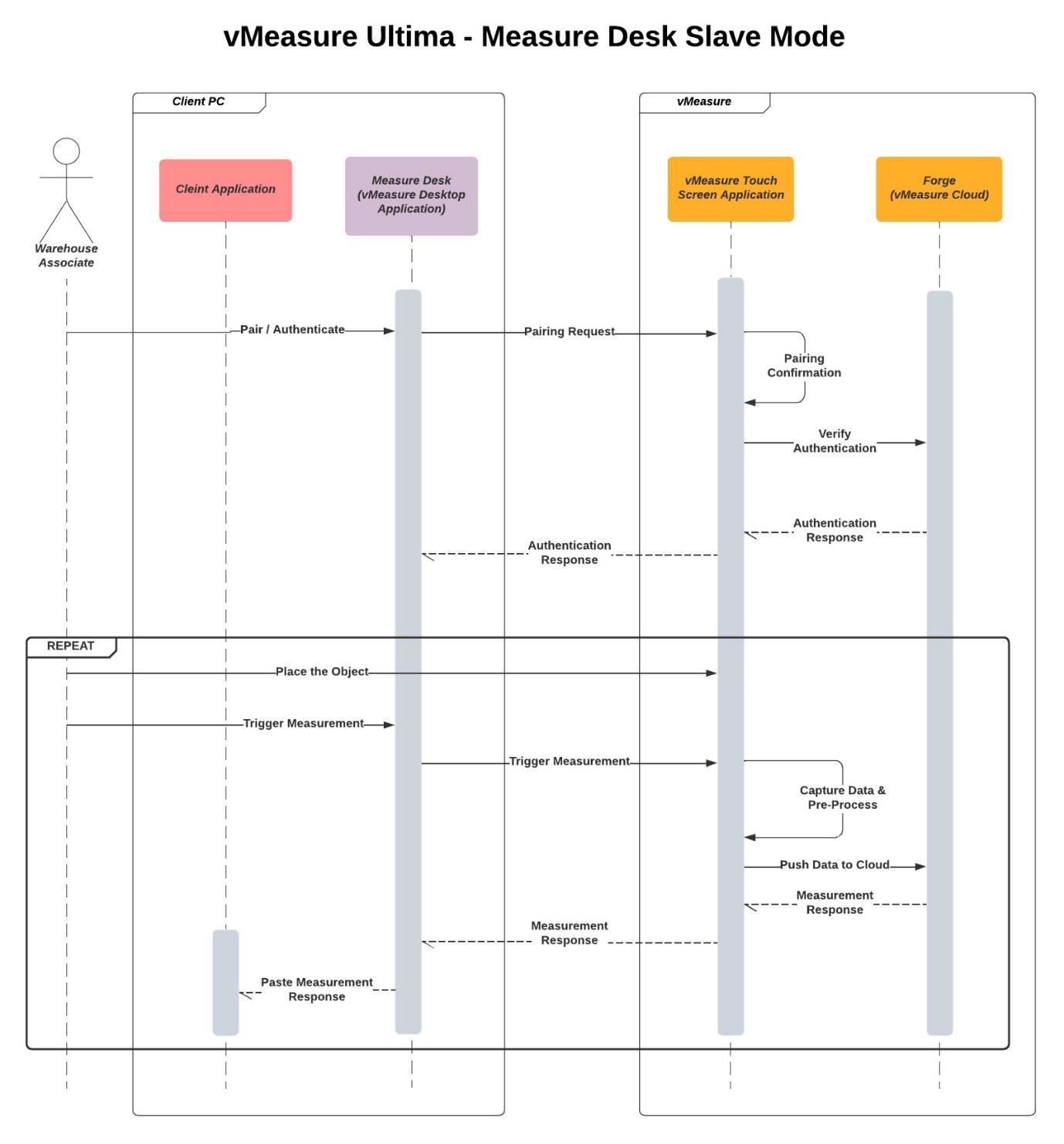
Was this article helpful?
That’s Great!
Thank you for your feedback
Sorry! We couldn't be helpful
Thank you for your feedback
Feedback sent
We appreciate your effort and will try to fix the article