Step 1: Turn off the main power supply of the vMeasure device.
Step 2: Carefully remove all cables from the old VHU(Vision Head Unit).
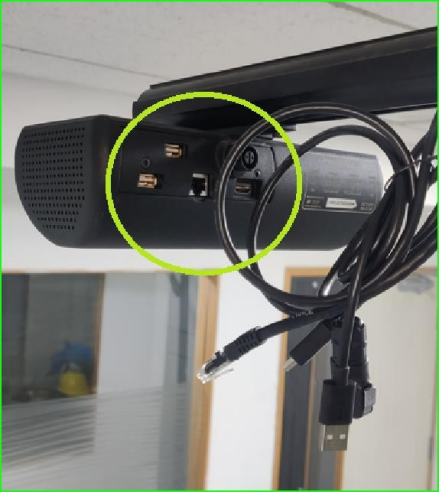
Step 3: Use a 4mm Allen key to loosen the two T-nut screws in the VHU to remove it from the horizontal pole.
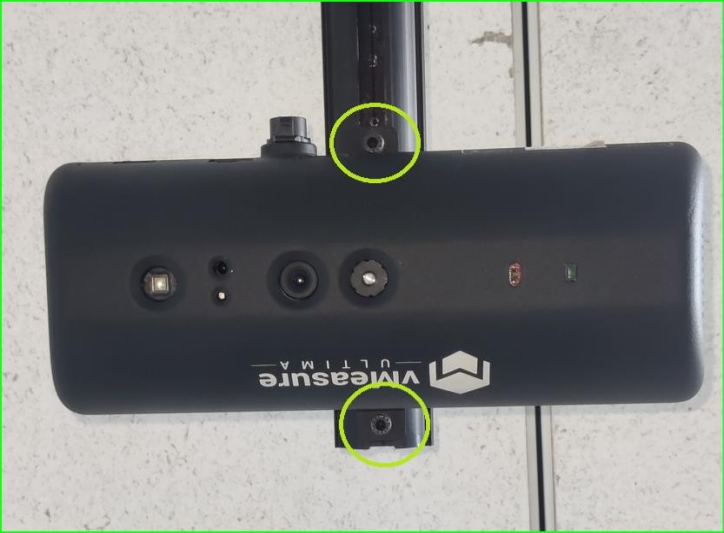
Step 4: Install the new VHU on the horizontal pole in the same orientation as you dismantled it, and then tighten both T-nut screws.
Step 5: Plug all cables into the VHU and their designated ports.
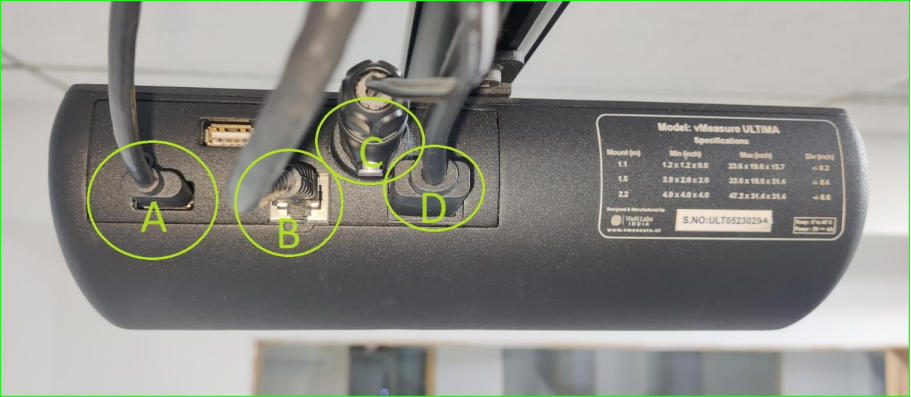
A - Power Box Cable / Type : USB (A)
B - Ethernet Cable / Type : RJ45
C - VHU Power Cable / Type : Evelta Connector
D - Display Cable / Type : HDMI
6. Turn ON the main power supply of the vMeasure device.
If you need any support , please drop a mail to vmeasure@visailabs.com or Click here to Submit a Ticket.
Was this article helpful?
That’s Great!
Thank you for your feedback
Sorry! We couldn't be helpful
Thank you for your feedback
Feedback sent
We appreciate your effort and will try to fix the article