Step 1: Connect the Symbol Barcode Scanner to the vMeasure device.
Step 2: Scan the “Default Mode” barcode to reset the scanner to its default settings.
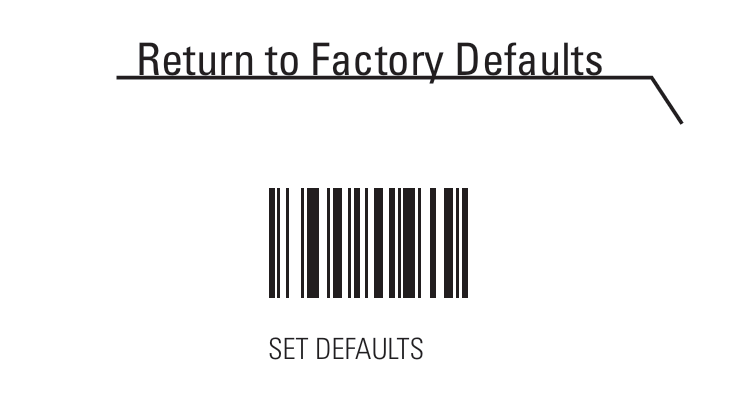
Step 3: Scan the “HID Keyboard Emulation” barcode.

Step 4: Scan the "ADD AN ENTER KEY (CARRIAGE RETURN/LINE FEED)" barcode
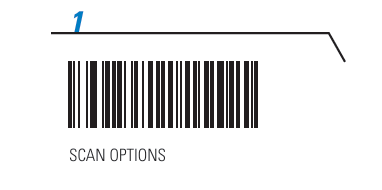
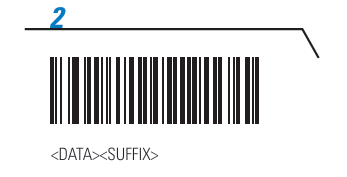
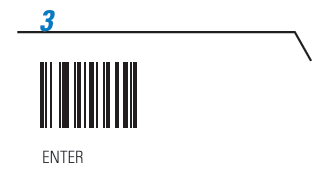
Step 5: Once the above barcode has been scanned removed the barcode scanner from the device and reconnect it back. And navigate to below setting.
Settings > Barcode > Select HID (ensure the correct model is chosen). eg : Symbol Technologies Bar Code Scanner
Please find the manual link for your reference :
If you need any support , please drop a mail to vmeasure@visailabs.com
Was this article helpful?
That’s Great!
Thank you for your feedback
Sorry! We couldn't be helpful
Thank you for your feedback
Feedback sent
We appreciate your effort and will try to fix the article