Causes of Scanner Issues:
Check for Physical Damage
Inspect the scanner for any visible damage, such as cracks or scratches on the lens or sensor. A damaged lens can prevent the scanner from reading barcodes accurately. Also, test the scanner's buttons (if applicable) to make sure they are functioning correctly.Verify Scanner Settings
Confirm that the scanner is properly configured to read the specific type of barcode you're scanning. Incorrect settings can cause the scanner to fail to read certain barcodes. If you're using a wireless model, ensure it’s properly paired with the device. For wired models, check that the USB cable or connection is secure. Also, ensure the scanner is in the correct mode for your intended use.Perform a Factory Reset
Refer to the scanner’s manual for instructions on how to reset it to its default settings. A factory reset can resolve any misconfigurations that might be affecting the scanner’s performance.
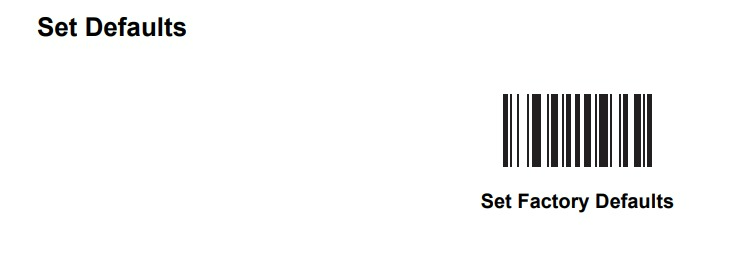
You can scan above barcode for factory reset
4. Test the Scanner with a Known Working Barcode
If the scanner is still not working, test it with a barcode (or QR code) that is known to be working. If the scanner is unable to read a clearly printed, high-quality barcode, this could indicate a hardware issue.
5. Test the Scanner with Other Devices
For wired scanners, try connecting it to a different USB port. If you're using a Bluetooth scanner, attempt to re-pair it with another device to rule out connection problems. For rechargeable or battery-operated models, ensure the battery is fully charged, as low or faulty batteries can cause inconsistent or poor scanning performance.
6. When to Replace the Scanner
Consider replacing the scanner if:
Physical Damage to Key Components: If the lens, sensor, or other critical internal parts are damaged beyond repair or if fixing them is not cost-effective.
Persistent Malfunctions: If the scanner continues to have issues after troubleshooting, such as consistently failing to scan barcodes or experiencing unresolved connectivity problems.
Out of Warranty or Expensive Repair: If the cost to repair the scanner exceeds the cost of buying a new one or if the warranty has expired and the scanner is no longer functioning properly.
Was this article helpful?
That’s Great!
Thank you for your feedback
Sorry! We couldn't be helpful
Thank you for your feedback
Feedback sent
We appreciate your effort and will try to fix the article